
MAXQDA is a single-user program: only one person can work on a project file at a time. TeamCloud makes collaborative analysis possible by letting each team member work on their own local copy of the project. Work is exchanged through the cloud on a structured, cycle-based schedule.
The team consists of one team lead and up to four team members. The team lead owns the main project file and is responsible for uploading it, importing everyone's contributions, and managing the project. Team members download the project, do their analysis, and upload their results for the team lead for review and merging.
A TeamCloud project is stored in the .mqtc file format. Audio, video, image, and PDF files attached to the project are synchronized automatically through TeamCloud, so no one needs to share these files separately.
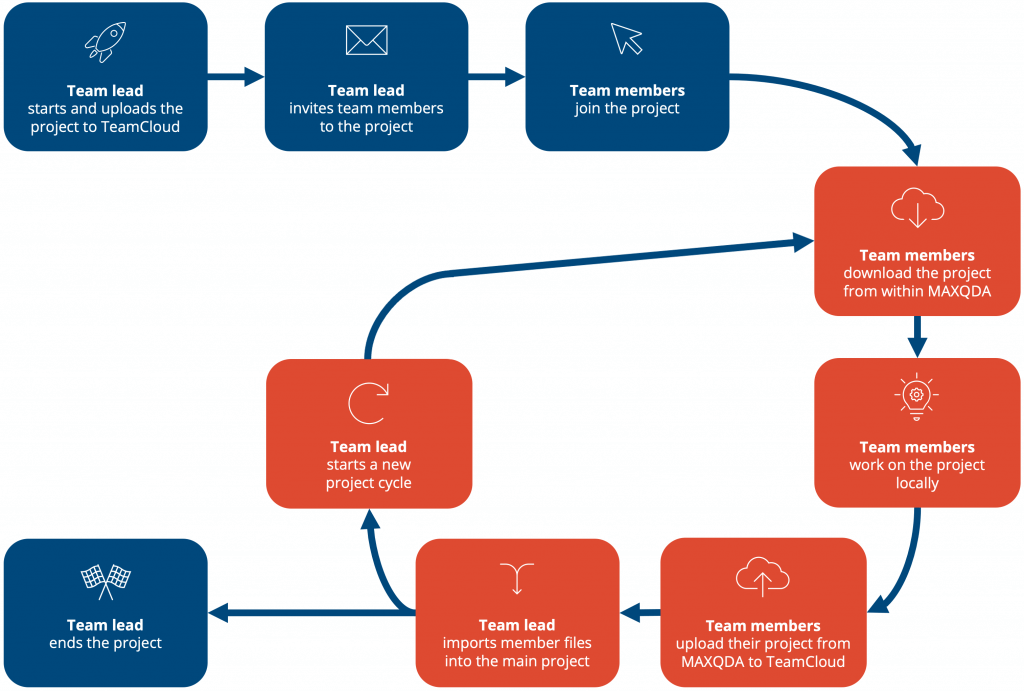
A project can run for one or multiple cycles, depending on the scope of the work. Each cycle follows the same pattern: the team lead uploads, members download and work, then upload, and the team lead imports.
Cycle-based team collaboration
The following illustration shows a typical TeamCloud workflow from start to finish. The red boxes represent the steps that may be repeated as often as needed.
See it in action
The following video (51 seconds) shows the TeamCloud workflow at a glance: how the team lead shares a project, how team members download and work on it offline, and how everyone's contributions are brought together at the end of a cycle.
In this chapter
- Before you start — License and account requirements, role permissions, and login setup: everything you need before starting your first TeamCloud project.
- Your project cycle: Team lead — Step-by-step guide to uploading a project, inviting members, importing their contributions, and managing cycles from start to finish.
- Your project cycle: Team member — Step-by-step guide to downloading a project, working on it locally, and uploading your work to the team lead.
- Storage and best practice — Where TeamCloud projects are stored on your computer, how to change the workspace location, and tips for avoiding data loss and conflicts.
- The TeamCloud website — Managing projects, team members, the project logbook, and account settings from the MAXQDA Account website.
- Backing up a TeamCloud Project — Creating and restoring backups of your TeamCloud project, including automatic and manual options.
- Recovering work done outside TeamCloud — What to do if you worked on a regular MAXQDA project file instead of your TeamCloud project file.
- Migrating from MAXQDA 24 — How to move an existing TeamCloud project from MAXQDA 24 to MAXQDA 26.
- Glossary — Definitions of key TeamCloud terms and concepts.
More resources
Quick start: TeamCloud Getting Started Guide
A short step-by-step walkthrough of the complete TeamCloud workflow, including screenshots. Note that some screenshots show an older interface, but the workflow is the same in current versions. The guide uses the term "TeamCloud account," which is now called "MAXQDA account."
Guide: Collaborative Data Analysis using MAXQDA TeamCloud
A practical guide to planning and conducting collaborative qualitative research projects using MAXQDA TeamCloud. Covers organizational, technical, and methodological aspects of teamwork, including a seven-phase workflow model for analysis based on division of labor.
