
To use this feature, you need the AI Assist add-on.
AI Assist offers two text-based reference actions for selected text: Explain This and Translate This. Both actions help you quickly clarify meaning or translate content directly during analysis, without exiting MAXQDA.
Available text actions
- Explain This: Generates definitions and elaborations for unfamiliar terms or concepts.
- Translate This: Converts selected text from one language into another.
How to use AI text actions
- Select text in the Document Browser.
- From the AI Assist main menu, select:
- Text Selection >
 Explain Selected Text, or
 - Text Selection > Translate Selected Text.
- Text Selection >
- In the dialog box, select the target language.
- Click OK to generate the result.
 Explain Selected Text, or
 Translate Selected Text.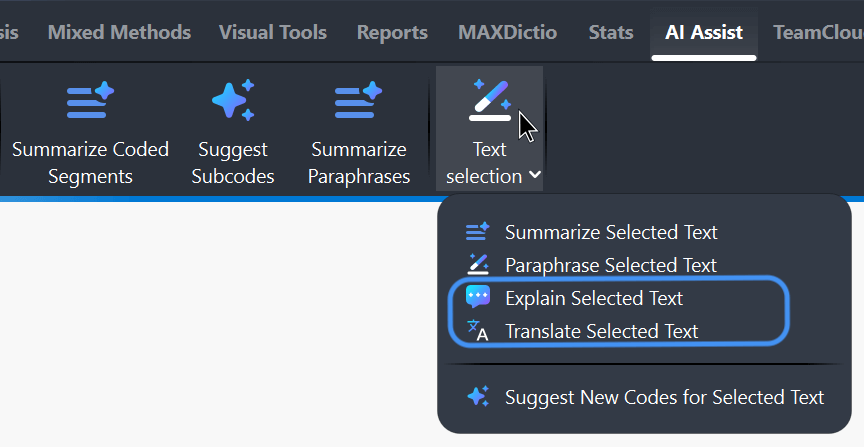
MAXQDA will notify you if the selected text does not meet the requirements for generating an explanation or translation.
Tip: When using "Explain This," you can choose a different language for the explanation than the document’s original language.
Working with results
The generated explanation or translation is displayed in a dialog box, where you can edit it if necessary. You can then choose how to handle the result:
- Save as Memo: Save the content as an in-document memo attached directly to the selected text. Existing memos are not affected.
- Copy: Copy the content to the clipboard for use elsewhere.
- Close: Close the dialog without saving the content.
 Save as Memo: Save the content as an
  Copy: Copy the content to the clipboard for use elsewhere.
You can also access these actions through other pathways:
- Highlight the text in the "Document Browser," then, click the AI Assist icon in the toolbar and choose Explain Selected Text or Translate Selected Text.
- Right-click the highlighted text, then select AI Assist > Explain Selected Text or AI Assist > Translate Selected Text from the menu.
 AI Assist icon in the toolbar and choose Explain Selected Text or Translate Selected Text.
- AI Assist provides reliable results in most cases. Nevertheless, it is still essential to check the output.
- AI Assist may not generate content if you request explanations or translations for critical content (violence, hate speech, bullying, etc.).
- You may get slightly varying results if you run the function for the same text more than once.
To learn more about how we safeguard your data and privacy in relation to our AI Assist, please visit our Data Privacy and Security page.
