Handle Even Large Projects with Ease in MAXQDA
Hundreds of interviews, thousands of open-ended survey responses, several waves of data collection, and a team spread across different locations: large qualitative projects play by their own rules. What you can keep in your head with twelve interviews needs a system once you have several hundred.
The good news is that MAXQDA handles very large projects well and helps you organize large volumes of data. You work in a structured way, make steady progress, and never lose sight of the big picture.
MAXQDA is particularly well suited to large projects and large amounts of data because it brings three things together. First, it keeps all your data in one project and organizes it with document groups, document sets, and variables. Second, activation lets you narrow any analysis down to exactly the data you need at that moment, so the essentials always stay in view. Third, a wide range of analysis functions and Visual Tools help you work through large amounts of data and visualize them. The result is clear findings that you can check and back up with evidence.
This post shows how MAXQDA makes working on large-scale projects easier and what to keep in mind when you plan one.
What Large Projects Demand and Why MAXQDA Is Built for Them
The size of a project is not just a matter of how many documents it contains. Usually, several factors come together:
- Volume: Hundreds of documents and tens of thousands of coded segments can no longer be reviewed one by one.
- Variety: Interviews, focus groups, surveys, PDFs, images, audio, and video all sit in the same project.
- Duration: The project runs for months or years, and decisions need to remain traceable.
- Team: Several people work with the same data and need to arrive at comparable results.
MAXQDA is designed for exactly these requirements. A MAXQDA project is a single file that contains your documents, codes, memos, variables, and results. MAXQDA saves changes automatically and immediately, so your data is always up to date and safe.
To keep a project running smoothly even when you analyze many media files, MAXQDA stores large files outside the project file. Audio and video files, as well as larger PDFs and images, are kept in a folder for external files. You decide the file size above which files are stored outside the project.
MAXQDA is desktop software and identical on Windows and macOS. Your data stays on your own computer, which is a clear advantage when you work with sensitive data or have to meet data protection requirements.
Organized from the Start: Structuring Your Data
In larger projects, structure determines how quickly you find answers later on. MAXQDA offers three complementary levels:
Document groups are the fixed folder structure of your project. You sort documents into folders, for example by wave of data collection, location, or data type.
Document sets are flexible, temporary collections of documents. A document can belong to only one document group, but to as many sets as you like. This lets you build subsamples without moving or copying anything.
Document variables record the characteristics of each case, such as age, region, or occupation. With Activate Documents by Variables, you use a formula to select exactly the cases that match your question. If you like, you can save the result as a document set.
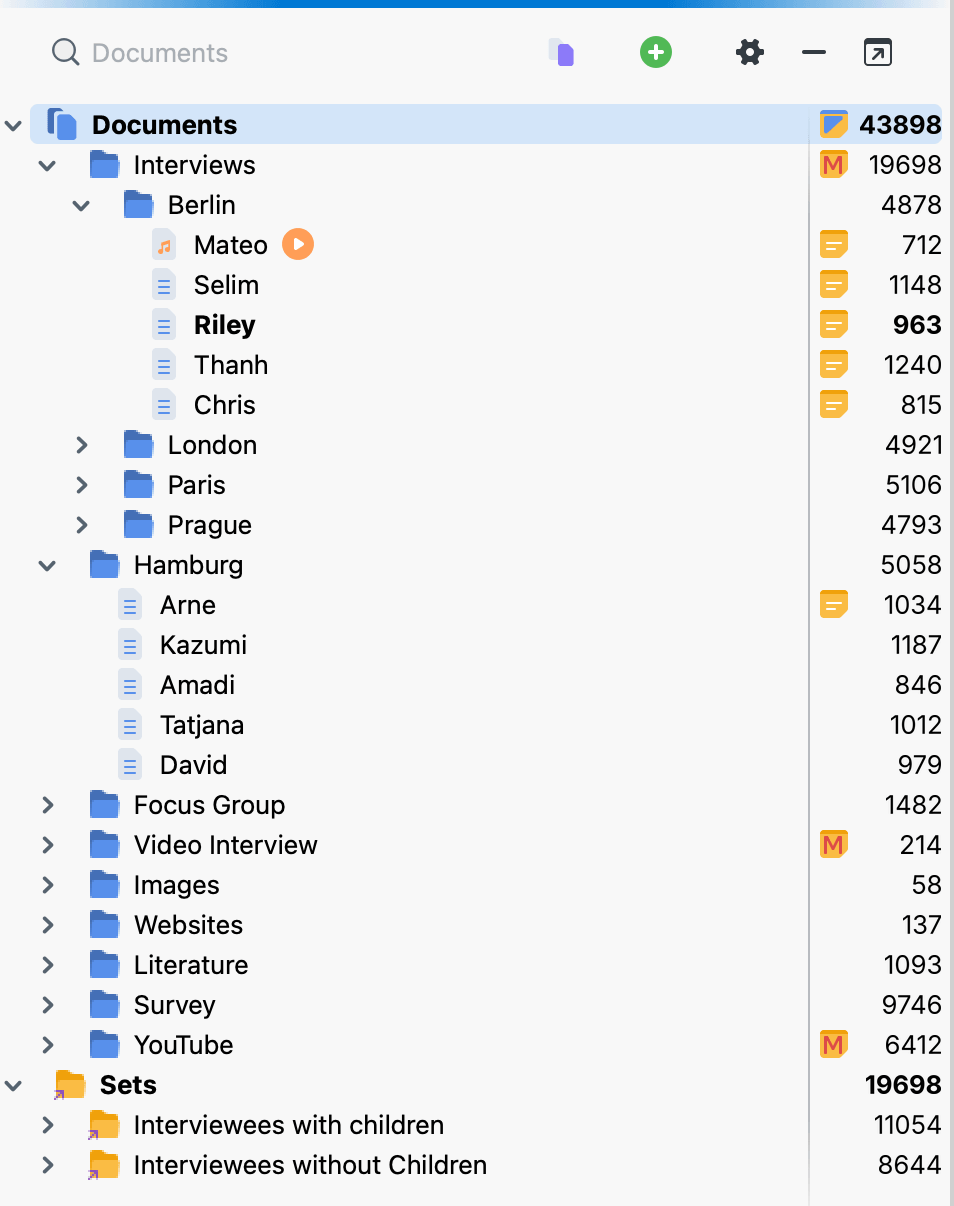
Importing is geared toward large amounts of data, too. You can import survey data so that each case becomes its own document. Answers to closed-ended questions can be imported as document variables, while open-ended responses are ready for coding. For focus group transcripts, MAXQDA automatically codes each participant’s contributions with a code of their own, so you can always tell who said what.
Coding at Scale Without Giving Up Control
With large amounts of data, coding comes down to two things: a pace that lets you get through the material, and a Code System that stays manageable.
A Faster First Pass
With the text search, you search all or selected documents for terms and autocode the search results. Before you do, you can review the list of hits and exclude individual ones. You also decide how much context is coded: only the hit itself, or the sentence or paragraph around it.
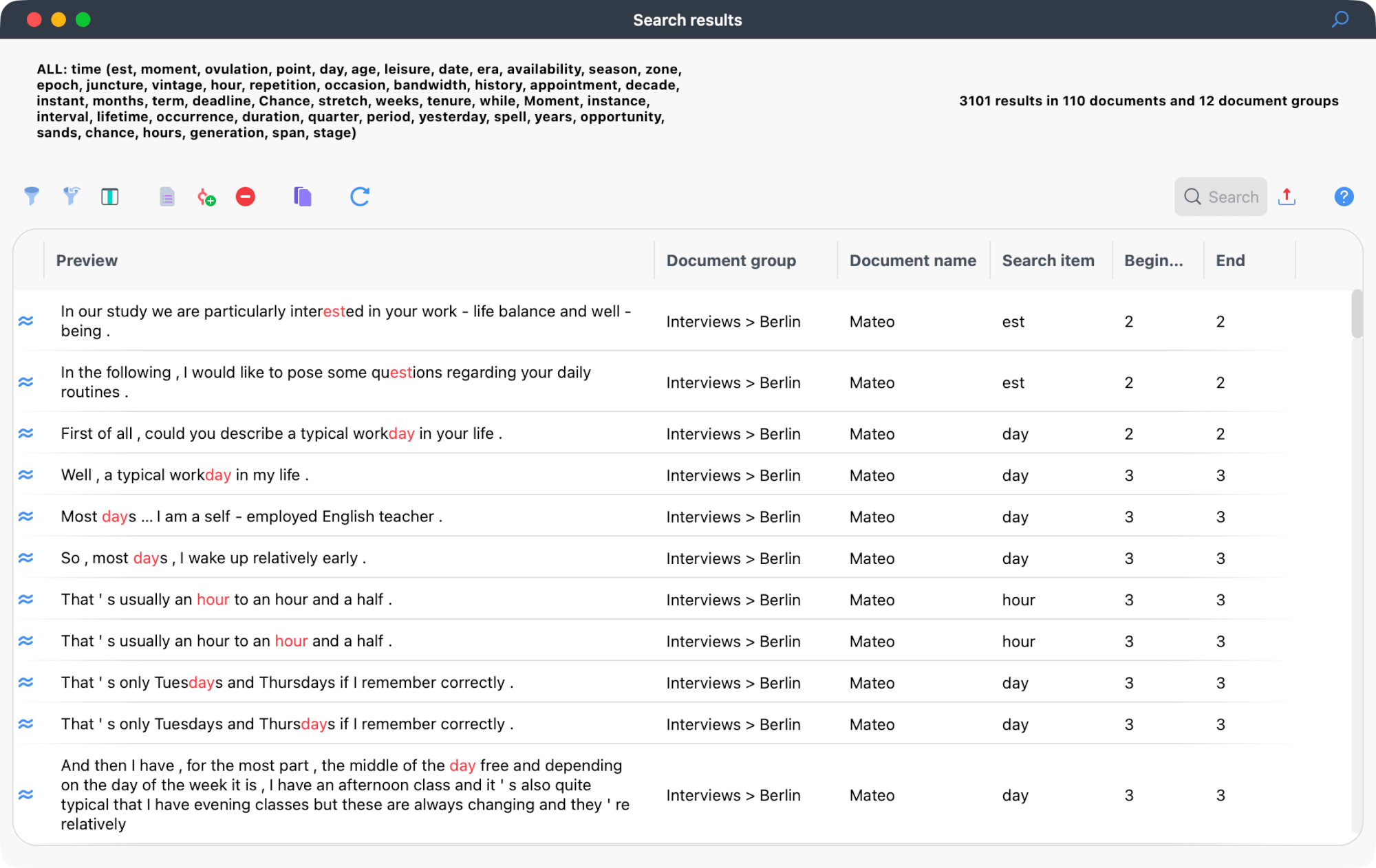
MAXDictio is the MAXQDA tool for the quantitative analysis of text data. In a dictionary, you define categories with search terms and automatically code your documents with them. Word frequencies and word combinations help you explore your texts and show you early on which terms actually matter in your material.
A Code System That Grows with Your Project
The Code System is hierarchical, and you can organize your codes on up to ten levels. You can move and merge codes at any time and assign colors to keep things clear. A code that turned out too broad is therefore not a problem. The Smart Coding Tool shows all segments of a code in a table, where you distribute them among subcodes and refine your category system step by step.
Activation: See Only What Matters
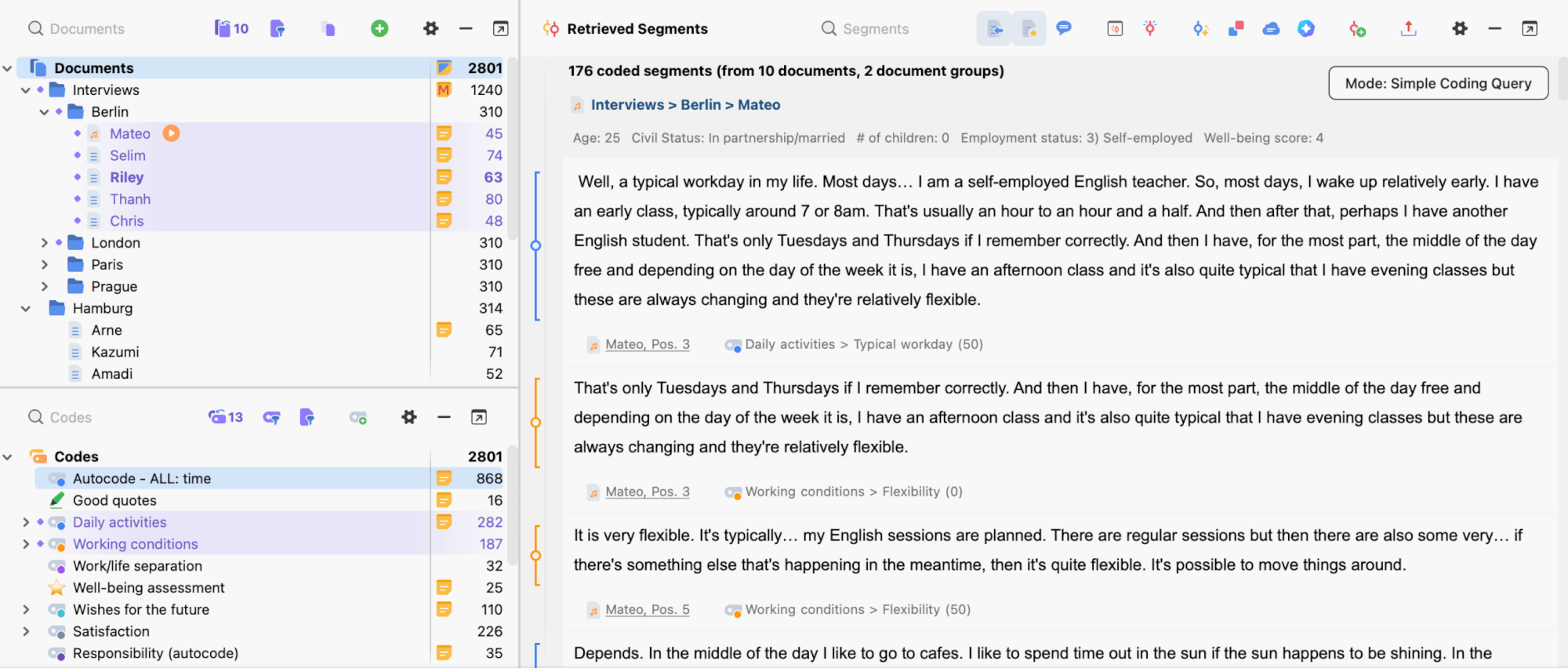
Activation is one of the most important mechanisms for large projects. You activate specific documents and codes, and the Retrieved Segments window shows only the segments that match this combination.
A question such as “What do nurses from the second wave say about workload?” takes just a few clicks to answer. Whether your project contains 30 or 3,000 documents makes no difference to how you proceed. That is precisely why large projects remain so manageable in MAXQDA.
For more complex questions, you combine codes in the Complex Coding Query, for example to find segments where codes overlap or occur near each other. Every segment stays linked to its source: one click opens the passage in the original document.
Spotting Patterns
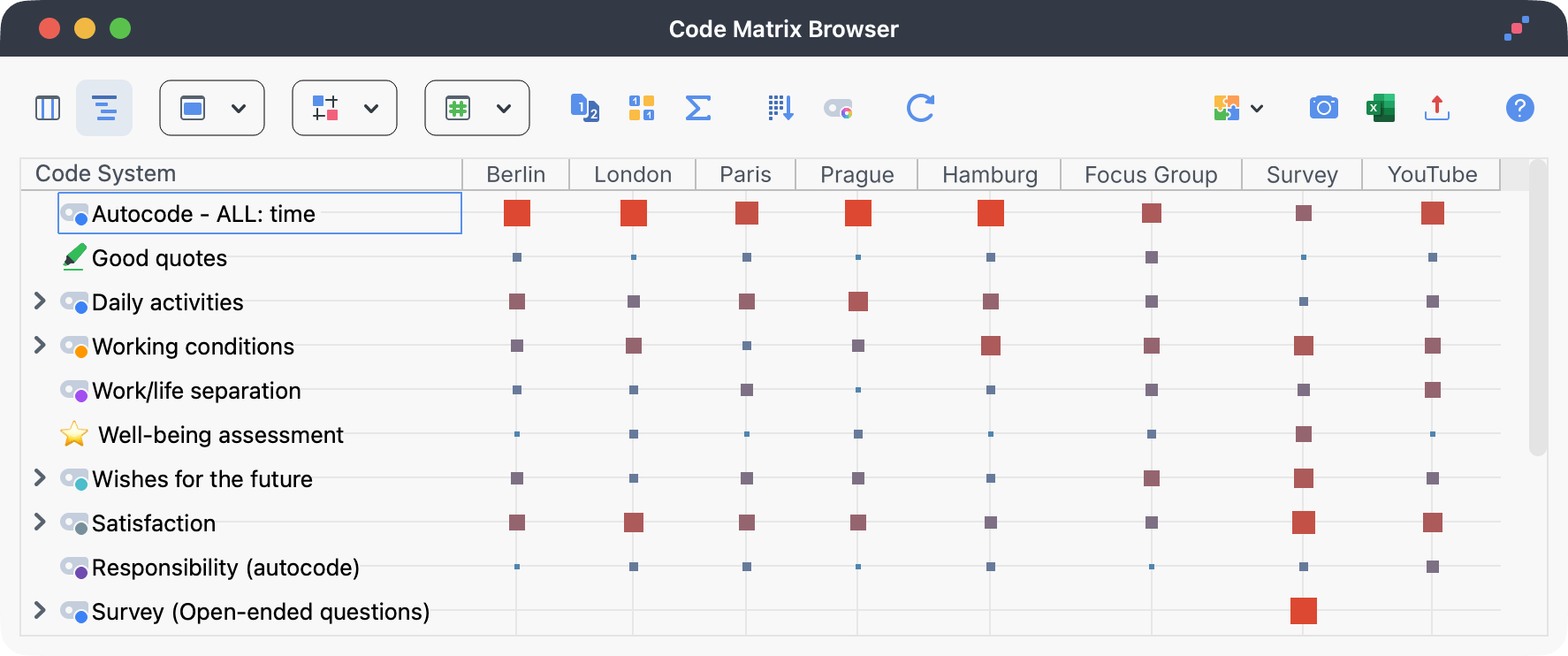
When you work through larger amounts of data, a bird’s-eye view helps. MAXQDA offers many ways to get an overview of your coded data, and from each of them you can jump straight back to the material.
- Code Matrix Browser: Shows how often each code occurs in which documents, groups, or sets. You see at a glance where a topic dominates and where it is missing.
- Code Relations Browser: Shows which codes occur together. This reveals connections and overlaps between topics that might stay hidden when you read documents one at a time.
- Crosstab: Compares code frequencies between groups that you define with document variables, for example by region or age group.
- Table overviews: List coded segments, codes, or memos. You can filter, sort, and export them.
- Summary Grid: Captures what was said for each case and topic. Hundreds of segments turn into case summaries that you can compare.
In mixed methods projects, you bring qualitative and quantitative data together, and code frequencies are easily turned into document variables. With the MAXQDA Stats module, you can analyze them statistically.
To make sure nothing gets lost along the way, collect interim results in Questions – Themes – Theories and build a bridge from your data to your research report. Analysis windows such as the Code Matrix Browser send their current view directly to a worksheet. Especially in projects that run over a long period, this keeps the path to your conclusions visible.
Analyzing Together: Large Projects in a Team
Large amounts of data are rarely handled by one person alone. MAXQDA offers two ways to collaborate.
Teamwork is included in MAXQDA. Team members code their documents in their own copy of the project, then export their work and import it into the shared project. Alternatively, you can merge two projects completely.
TeamCloud is a paid add-on that automates this exchange. The team lead distributes the project, everyone works locally on their own computer and uploads their results, and MAXQDA merges the work. There is no need to send files back and forth manually.
The more people are coding, the more important a shared understanding of the codes becomes. Two tools help with this:
- Code memos keep definitions, boundaries, and anchor examples right at the code. From there, you can export the codebook in a few clicks.
- Intercoder Agreement compares how two people coded the same documents. You see differences segment by segment and can resolve them as a team.
Because MAXQDA is identical on Windows and macOS, it does not matter which operating system your team members use. Projects are 100% compatible across both.
AI Assist: Support When Volume Becomes a Hurdle
The AI Assist add-on gives you targeted, reliable support with large amounts of data. You decide at all times whether and for what you use it.
- AI Summaries summarize documents or the segments of a code, which helps you find your way around extensive material.
- AI Paraphrase restates selected passages in concise form, so you can condense long passages segment by segment.
- AI Coding suggests codings based on criteria that you define, for documents as well as for segments and survey responses. Every assignment comes with an explanation.
- AI New Code Suggestions offer ideas for codes for a highlighted passage.
- AI Subcode Suggestions help you break down an extensive code further.
- AI Chat answers questions about your data and points to the passages its answers are based on.
- AI Report drafts a report on your data that you then revise.
- AI Explain & Translate explains or translates highlighted passages, which is useful for technical terms and multilingual material.
AI Assist supports your analysis and does not replace your judgment. The results are suggestions that you review, adjust, or discard. AI Assist is GDPR-compliant, and data is processed in the EU.
Seven Tips for Starting a Large Project
- Plan your structure. Decide on document groups, file names, and variables before you import.
- Set up backups. Turn on automatic project backups and also save a copy of the project externally on a regular basis.
- Keep groups manageable. Plan for up to about 1,000 documents per document group and spread larger collections across several groups. This keeps your work smooth and the list easy to scan.
- Store media files externally. Keep audio, video, and large PDFs in the folder for external files. The project file stays small, and performance remains stable.
- Define your codes. Write a code memo with a definition and an example for every code. Especially in a team, this is the foundation for consistent coding.
- Set permissions. When you work in a team, use User Access Management to define roles and decide which users are allowed to do what.
- Document your decisions. Use the Logbook to record what you changed and when. In a long-running project, these notes make it much easier to retrace your steps.
Guidelines for Planning
These guidelines help you set up a large project properly from the start. They are recommendations for smooth performance, not fixed upper limits.
| Area | Guideline |
|---|---|
| Documents per document group | up to about 1,000 |
| Coded segments per project | up to about 200,000, correspondingly fewer with less than 4 GB of RAM |
| Rows per table document | up to about 1,000 |
| Levels in the Code System | 10 at most |
| Length of a code name | 127 characters at most |
You will find the complete overview in the manual under Limitations and Technical Information.
Conclusion: MAXQDA Keeps Even Large Projects Under Control
Large projects rarely fail because of the sheer amount of data. They fail because the overview is lost. MAXQDA gives you exactly that overview: a clear structure for your data, activation for focused questions, and tools that make patterns visible.
This lets you handle even several hundred interviews with confidence and keep your time for what really matters: your analysis.
Would you like to see for yourself? Start your free 14-day trial now.