All qualitative researchers know this moment: hours upon hours of interview recordings, focus group discussions, or speeches still need to be transcribed, even as the deadline for analysis and evaluation keeps getting closer. Before a single word can be coded, all of this spoken material first has to be turned into text. Because without careful transcription, there is no systematic qualitative analysis. So that you can put your valuable time directly into analyzing and evaluating your data, MAXQDA offers MAXQDA Transcription: an AI-powered solution built directly into your project that automatically turns audio and video files into searchable transcripts with timestamps. This significantly eases one of the most time-consuming steps in the entire research process, so you can focus on what matters most.
In this post, we’ll look at why transcription is so methodologically important, what hurdles classic manual transcription of media files brings with it, and how MAXQDA can support you with the workflow of automatic transcription, starting with importing your data, through AI-based processing, to a text file that is ready for analysis and linked to the original media file.
Why Transcription Is the Foundation of Every Qualitative Analysis
Qualitative research lives on closeness to the material. Coding, paraphrasing, working with the Code System, or searching for recurring patterns across multiple cases and your data all require the data to be available in a form that can be searched, highlighted, and structured. Pure audio tracks only allow this to a limited extent: you can listen to segments and even code directly in the video or audio, but systematic, word-for-word analysis, comparing phrasing between interviews, or searching for specific terms only becomes truly practical once a written version of the source exists.
This makes transcription much more than a tedious preliminary task. It is the moment when researchers truly immerse themselves in their material for the first time: anyone who transcribes themselves, or at least carefully cross-checks every transcript, often notices initial patterns, contradictions, or striking phrasing while transcribing, long before the actual coding begins. A precise transcript is also the prerequisite for traceable Intercoder Agreement calculations, for reliable quotations in publications, and for an analysis that can always be traced back to the original statement.
In other words: the quality of the transcription largely determines the quality of the entire analysis built on top of it. That is exactly why it is so important that this step doesn’t demand too much of your energy, so you can direct your attention to the substantive work.
The Classic Effort: Why Manual Transcription Slows Researchers Down
Anyone who has ever transcribed a one-hour or longer interview by hand knows just how much effort manual transcription involves. Depending on speaking pace, audio quality, and the experience of the person transcribing, writing up just one hour of audio material often takes four to six hours. With multiple interviews, focus groups, or a larger sample, this quickly adds up to weeks of pure transcription work. That time is then missing for what actually matters: engaging with the content of the data, developing a Code System, writing memos, and theory-building.
On top of that, manual transcription is prone to error, especially during long sessions, with multiple speakers, or specialized terminology. If the transcription is outsourced to external service providers, additional costs and waiting times arise. For many projects – whether a term paper, thesis, doctoral project, or larger research study – it is precisely this step that becomes the real bottleneck, not the analysis itself.
MAXQDA Transcription: Automated Transcription Directly in Your Project
This is where MAXQDA comes in. With MAXQDA Transcription, audio and video files – such as individual interviews, group discussions, or speeches – can be automatically transcribed directly within MAXQDA and added to your project. The AI-powered transcription processes the recording, generates a text file based on it, and automatically links the finished transcript to the original media file in your Document System.
Tip: Particularly convenient: MAXQDA Transcription is available both directly in the desktop application with a MAXQDA license and as a standalone web application. Through the web application, MAXQDA Transcription can also be used without an existing MAXQDA license. This post focuses on using it within the software and with a MAXQDA license, since this is where the transcribed texts land directly in your analysis project and can be processed further right away.
What You Need for Automatic Transcription
Before you get started, three prerequisites should be met:
- A MAXQDA license with the Transcription add-on activated. You can check whether it is already active via the info icon on MAXQDA’s welcome screen, or via ? > License Status. Transcription must be listed there under “Cloud modules.”
- A free MAXQDA account. Since transcripts are generated in the cloud on EU-based servers, an account is required to manage transcription jobs, access finished transcripts, and purchase transcription time.
- A transcription time balance. When you first set up a MAXQDA account, you receive 60 minutes of free transcription time to test the service; beyond that, you can purchase additional transcription time as needed.
An active internet connection is only needed when uploading the media file and starting the transcription process – during the actual processing, you don’t need to stay online or remain signed in to MAXQDA.
It’s That Simple: The Workflow Step by Step
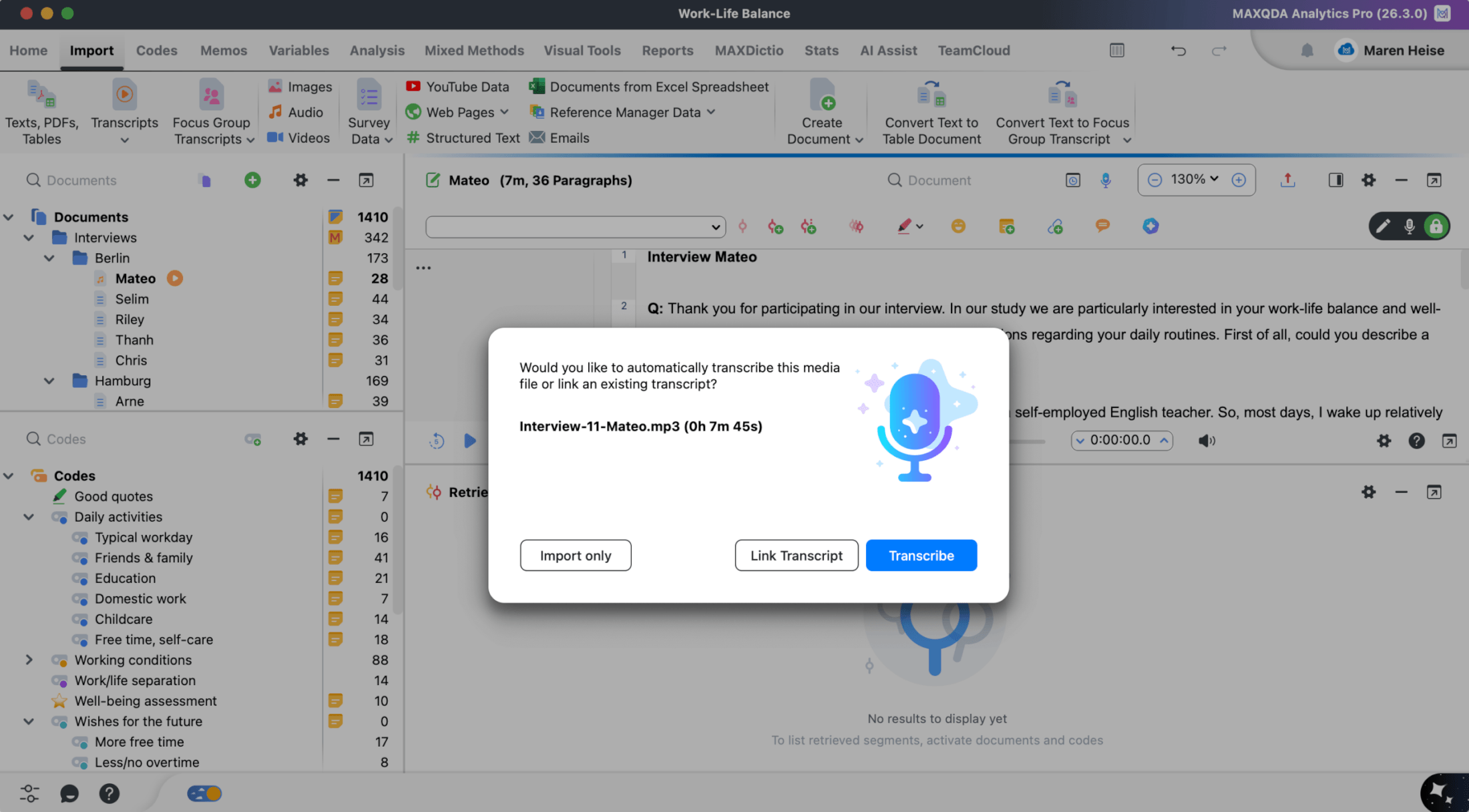
The actual process is deliberately kept lean:
- Open MAXQDA and sign in. Open your project and sign in with your MAXQDA account via Sign In in the top-right corner.
- Import your media file. Drag the audio or video file directly into the Documents window, or use Import > Audio or Import > Video.
- Choose transcription. MAXQDA will now automatically ask whether you want to only import the file, link an existing transcript, or transcribe it right away – select Transcribe.
- Set the language and options. Select the language of the recording (this is crucial for accuracy), decide for English-language recordings whether filler words such as “uhm” or “err” should be transcribed, and, if needed, add your own specialized vocabulary including pronunciation notes.
- Start the transcription. A single click on Transcribe is enough, MAXQDA then processes the file in the cloud.
Processing typically takes about one-third of the recording’s length, so a one-hour interview is usually fully transcribed after around 20 minutes. A progress indicator in the toolbar shows how many transcription jobs are currently running. As soon as a transcript is ready, MAXQDA notifies you via a notification in the top-right corner, from which you can also open the transcript directly. It is automatically saved in your MAXQDA project’s Document System together with the corresponding media file.
Supported file formats: AAC, FLAC, M4A, MP3, MP4, OGG, WAV, with a maximum file size of 1 GB. If your recording is in a different format, you will need to convert it accordingly before importing.
Precision Through Customization: Language, Vocabulary, and Filler Words
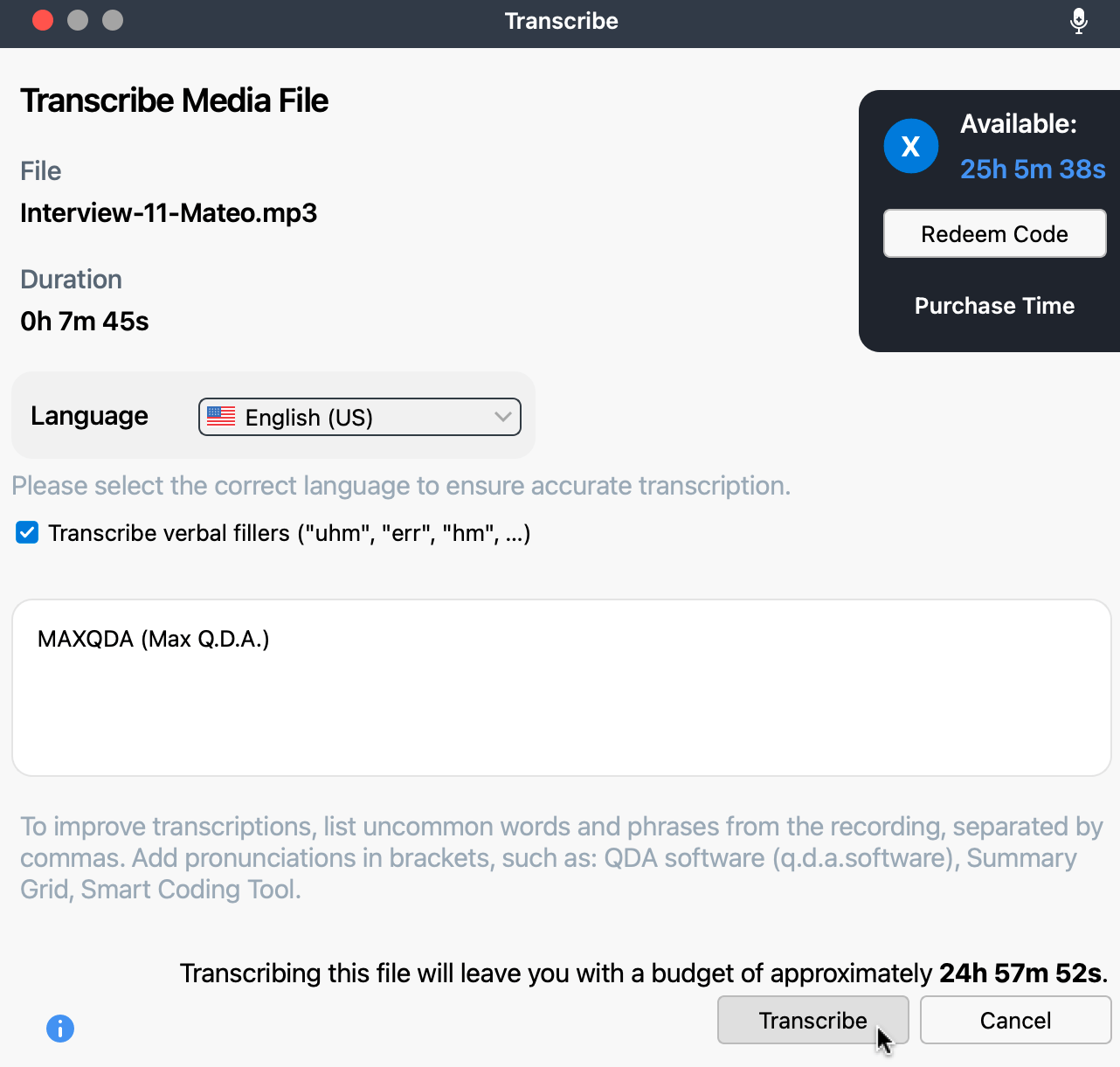
A key advantage of MAXQDA Transcription is that quality and accuracy can be deliberately controlled:
- Over 50 supported languages. This means MAXQDA Transcription covers the vast majority of research contexts, from international studies to regionally limited surveys. Important: a recording cannot automatically be transcribed in multiple languages, with the exception of mixed English-Spanish recordings.
- Add your own vocabulary. Technical terms, proper names, or product names (such as “MAXQDA” itself) can be entered in advance, optionally with pronunciation instructions in parentheses. This significantly increases accuracy for specialized terminology, for example in medical, legal, or technical interview contexts.
- Filler words for English-language recordings. Anyone who also needs filler words such as “uhm” or “err” for discourse analysis or conversation analysis can have these specifically transcribed instead of having them automatically filtered out.
Tip: Always deliberately choose recordings with a single dominant speaker or clear audio quality, since transcription accuracy can be expected to decrease with strong background noise, overlapping speakers, or strong dialects.
The Alternative: Manual Transcription in MAXQDA
Anyone who prefers to transcribe themselves, whether for methodological reasons, personal preference, or simply out of habit, doesn’t need to switch to an external tool either: with Transcription Mode, MAXQDA also provides a fully-featured manual transcription environment directly in the Document Browser. After importing an audio or video file that is only imported and not automatically transcribed, Transcription Mode can be activated via the context menu or the mode switcher. It offers the following functions, among others:
- Playback control via keyboard shortcut or foot pedal: Use F4/F5 or a supported foot pedal to start and stop playback without taking your hands off the keyboard.
- Automatic timestamps: Timestamps are set automatically as you type, so text and recording remain linked, just as with automatic transcription.
- Automatic speaker labeling: MAXQDA can automatically switch between two saved speaker names with each new paragraph.
- Abbreviations: Frequently used terms or transcription conventions can be saved as shorthand and expanded automatically.
- Coding while transcribing: Text passages can be assigned directly to a code even while transcribing.
Manual transcription is particularly suited to situations where only a few short excerpts need to be transcribed. For most research projects, however, automatic transcription remains the clearly more efficient choice: instead of writing up every minute of audio material with a multiple of that in typing time, you get a complete transcript without losing time on manual transcription yourself – time that can instead flow into analysis, coding, and interpreting your results. Transcription Mode therefore remains a useful addition for individual cases, while MAXQDA Transcription is the faster and more economical solution for the majority of projects.
From Raw Text to Analysis: Timestamps, Synchronization, and Post-Editing
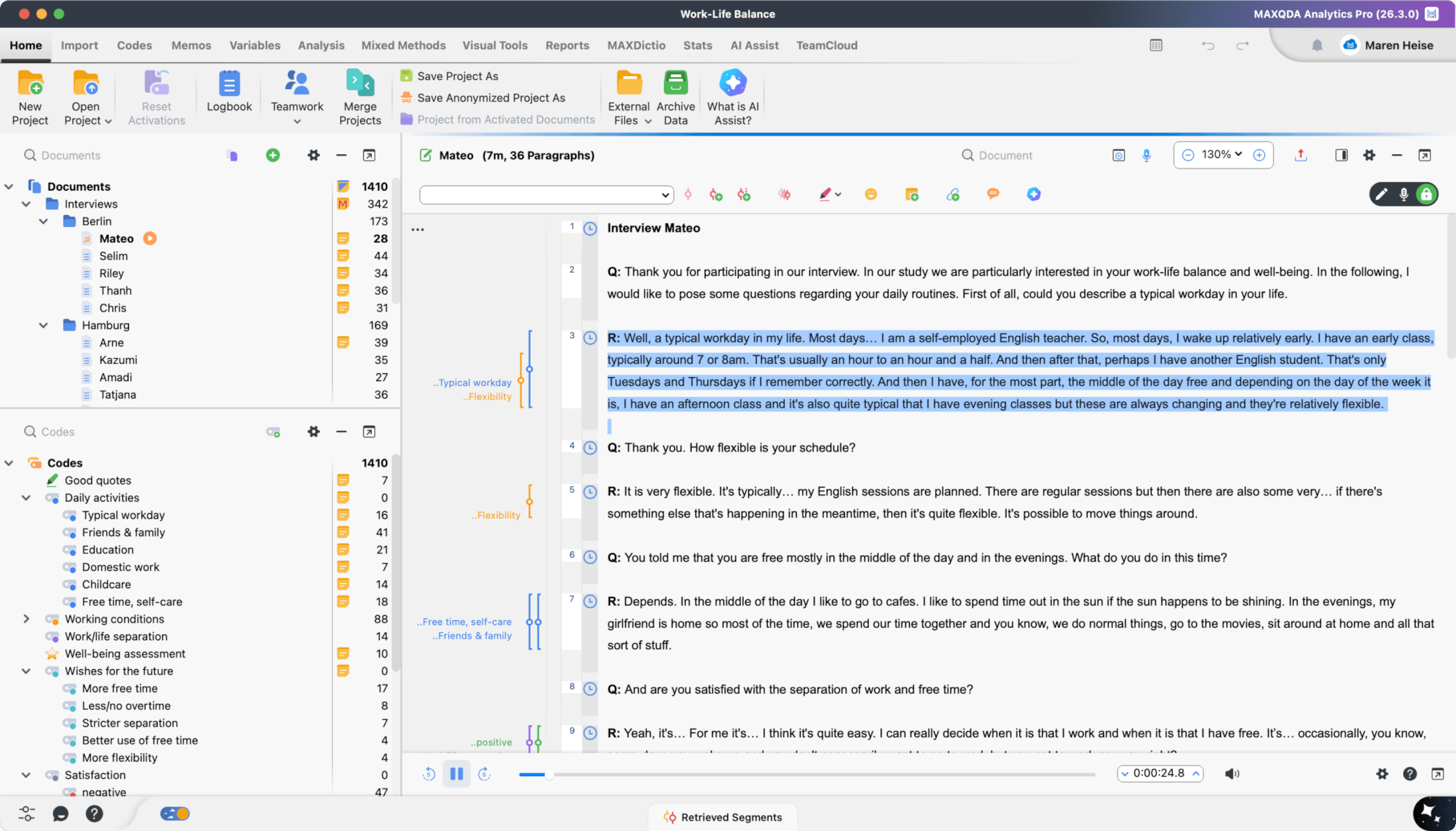
An automatically generated transcript in MAXQDA is not an isolated text document; it is connected to the original recording from the very start, so you can work with both at any time. Every transcript is given timestamps and linked directly to the corresponding audio or video file, allowing text and sound to be played back in sync. In concrete terms, this means: you click on a passage in the transcript and playback of the original recording jumps to exactly that point. And conversely, while listening to the recording, the matching passage in the text is automatically tracked along with it.
This link is methodologically extremely valuable, as it allows you to check the original tone of voice, pauses, emphasis, or nonverbal cues at any point during coding, rather than having to rely on the text alone, an aspect that can be crucial in discourse analysis, conversation analysis, or with sensitive interview topics.
Since automatic transcription, despite all its progress, is no substitute for human care, every AI-generated transcript should be reviewed and adjusted if necessary before the actual coding begins. MAXQDA supports exactly this step: transcripts can be edited directly in the Document Browser, so you can make your own adjustments before the finished, reviewed transcript feeds into the actual qualitative analysis.
Privacy and Security
Because MAXQDA Transcription is a cloud service, recordings are uploaded for processing and processed on EU-based servers. MAXQDA itself is a desktop application; only transcription runs as a separate cloud service.
Practical Examples: When Automatic Transcription Makes the Biggest Difference
MAXQDA’s automatic transcription is especially valuable in situations where large amounts of audio or video material need to be transcribed:
- Interview studies with many cases: With ten, twenty, thirty, or more interviews, manual transcription time quickly adds up to weeks. Automatic transcription reduces this effort to a fraction and creates time and space for the actual analysis.
- Focus groups and group discussions: Even when multiple speakers need to be cleanly separated, automatic transcription provides a solid initial text basis that can then be specifically edited and assigned to individual speakers.
- Speeches, talks, and conference recordings: Longer monologues with clear audio quality can be transcribed automatically with particular reliability.
- Time-critical projects: With tight deadlines, such as toward the end of a thesis, the time saved through automatic transcription can determine whether the project timeline holds.
Conclusion
Transcription is not a tedious chore to get through before the “real” qualitative analysis begins. It is an integral, methodologically significant part of the research process. With MAXQDA Transcription, this otherwise time-consuming step turns into a fast workflow built directly into your project: import the recording, choose the language, let it transcribe, and shortly afterward continue working with a timestamped transcript synchronized with the original media. Anyone who has experienced how much time this leaves for substantive work with the Code System, for memos, paraphrasing, and theory-building will wonder why they didn’t start transcribing automatically sooner.