
The Codebook function allows you to automatically generate a codebook that lists all or selected codes in the order in which they appear in your project, including the associated code memo for each code. If category definitions have been documented in the code memos, they are included in the Codebook. This simplifies the preparation of appendices for research reports and ensures consistent formatting of memo text.
The Codebook is generated as a Word document and can be opened with any standard word processing program. It contains:
- A cover page with the title “Codebook,” the project name, and the creation date.
- A table displaying the complete structure of your codes.
- A main section listing the codes and their associated memos in their hierarchical order.
Create a Codebook
To generate a Codebook, select Reports > Codebook. A dialog window opens where you can define the export options.
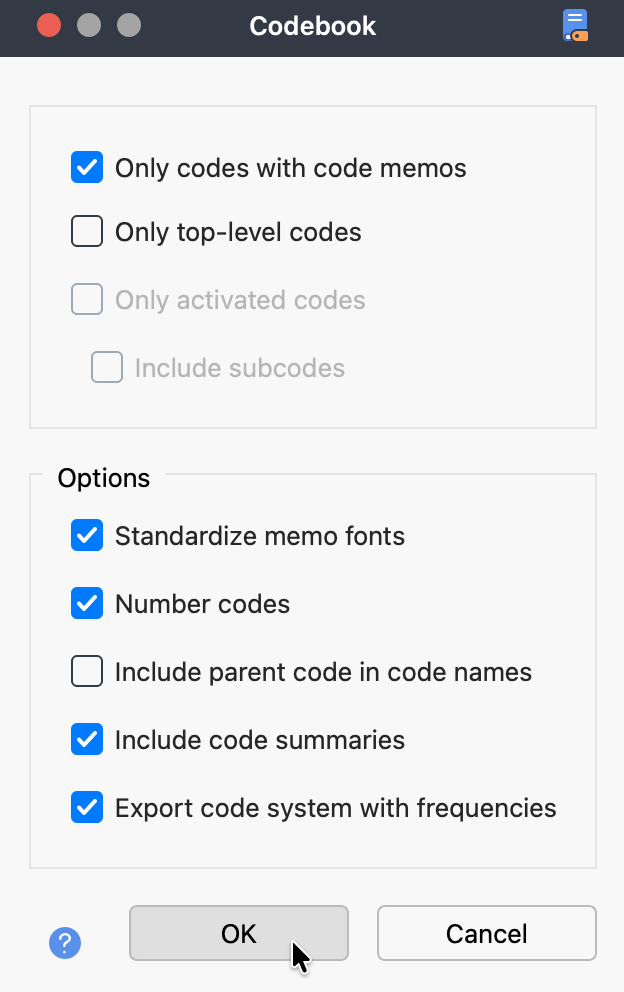
Select Codes
In the upper section of the dialog, specify which codes should be included:
- Only codes with code memos – Excludes codes without a memo.
- Only top-level codes – Includes only the highest-level codes. Subcodes are not included.
- Only activated codes – Includes only currently activated codes. You can optionally include inactive subcodes by selecting Include subcodes. This option is unavailable if “Only top-level codes” is selected.
Additional Options
In the lower section of the dialog, you can configure the following settings:
- Standardize memo fonts – Displays all memos using a uniform font, size, and style.
- Number codes – Numbers the codes according to their position within the hierarchical code structure.
- Include parent code in code name – Displays the full code path as the heading for subcodes.
- Include code summaries – Adds all available code summaries, including those generated by AI Assist. These summaries appear in the memo section for each code and are identified as code summaries.
- Export code system with frequencies – Adds a frequency column to the table that lists your codes.
After confirming your settings, choose a file name and storage location. The Codebook is then created and opened automatically.
