MAXQDA 26.3 (June 2026)
MAXQDA 26.3 expands AI Chat capabilities and streamlines transcription and media workflows. The chat is now more context-aware and supports memo analysis, while a new integrated media player simplifies work with audio and video files.
Here’s what’s new in MAXQDA:
- AI Chat 2.0: Context-Aware with Memo Support
- Transcription & Media in a Single Window
Read more about MAXQDA’s new features below.
AI Chat 2.0: Context-Aware with Memo Support
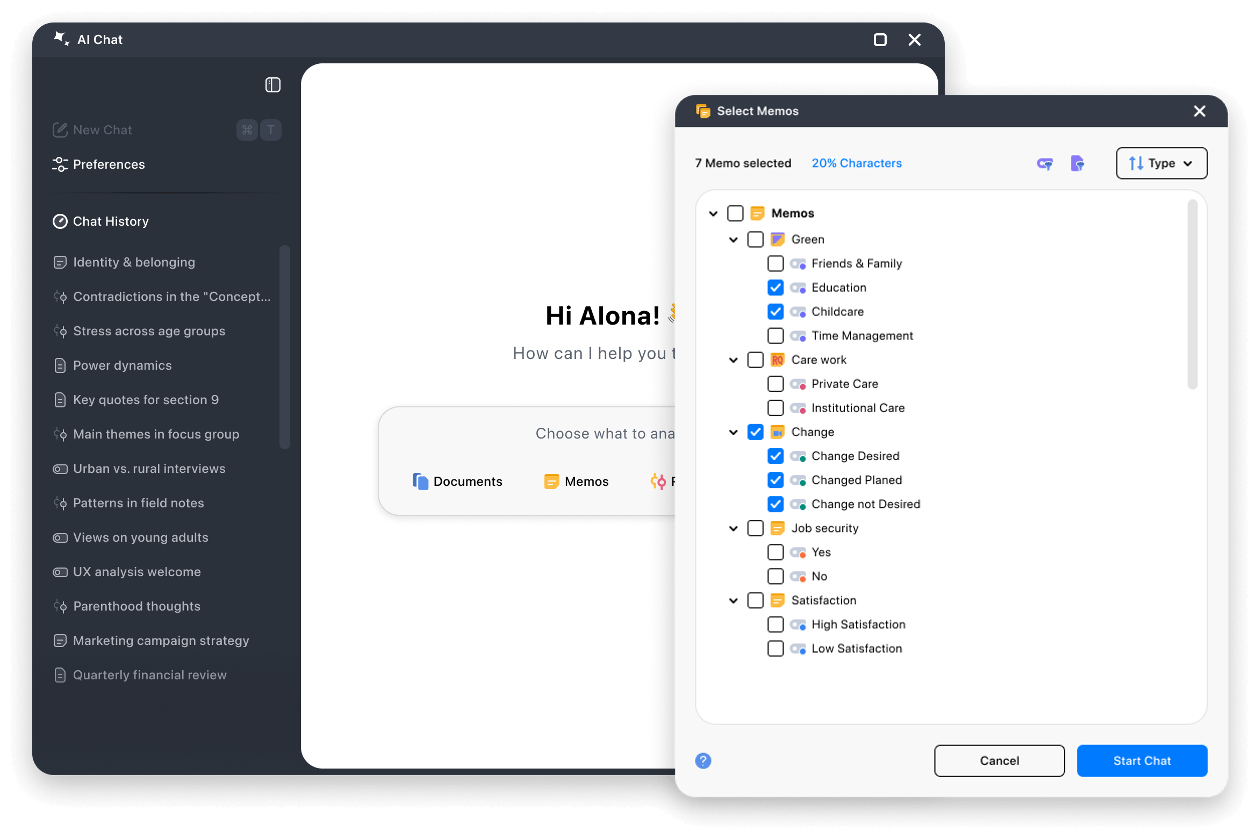
Chat Directly with Your Memos
Memos are at the heart of many qualitative research projects, often containing crucial interpretations, summaries, and theoretical reflections. Now, you can chat directly with your memos to work with them more effectively:
- Build Theory: Summarize groups of memos or search for recurring patterns.
- Leverage Memo Content: Use information from memos directly in your analysis.
- Support Reports: Organize or summarize insights from your logbook or specific memos for publications and presentations.
Context & Preferences for AI Analysis
Say goodbye to manually entering your research questions and objectives for every new chat. With the new Chat Preferences, you can save your project context and response preferences once and reuse them across chats:
- Project Context: Save your research questions, methods, and project goals in the chat settings to receive more relevant and accurate responses.
- Response Preferences: Define how responses should be structured, including language, format, length, or analytical focus.
Further Chat Enhancements
- Centralized Start: From the new welcome page, easily choose whether to chat with documents, segments, or memos.
- Automatic Titles: Chats automatically receive meaningful, descriptive names and are categorized with icons for a better overview in the chat history.
📍 Where to find it: AI Chat is now available everywhere in MAXQDA. Just click the new AI Chat icon in the bottom bar.
Transcription & Media: All in One Window
An Integrated Media Player in the Document Browser
The media player is now integrated directly into the document browser.
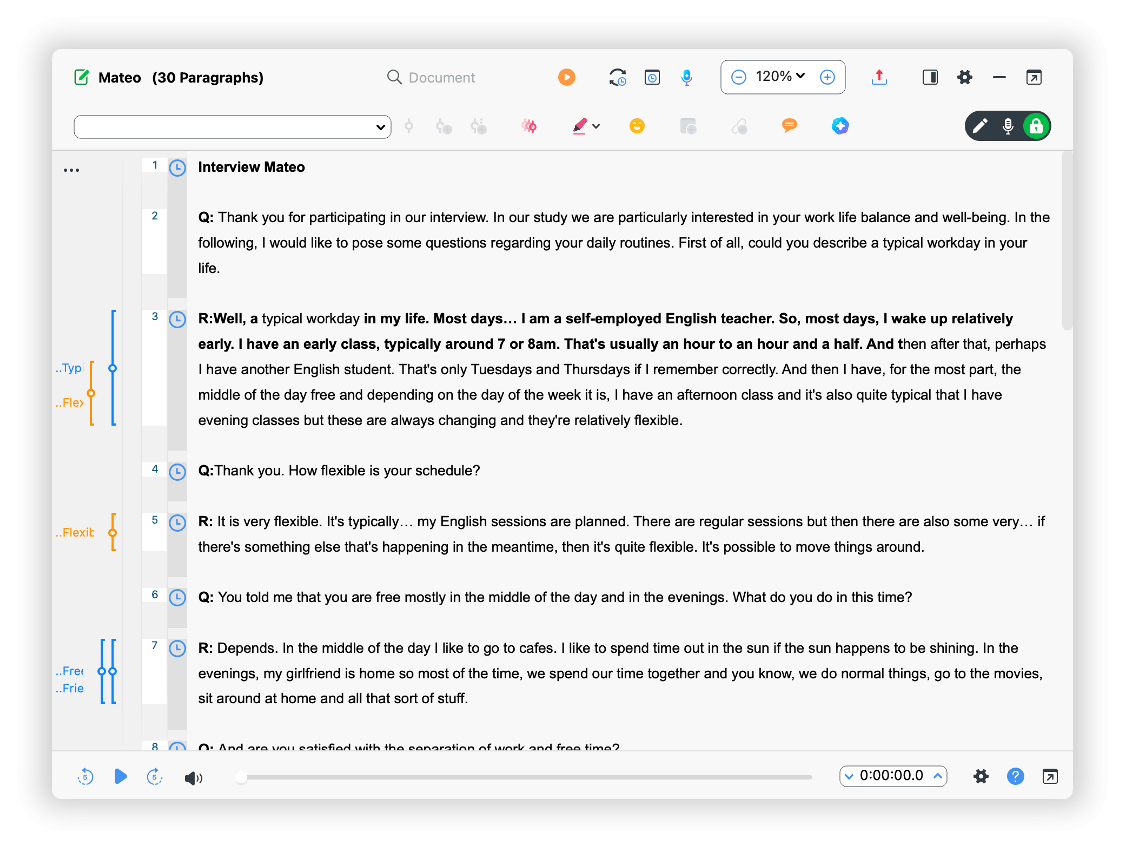
- Integrated Playbar: Play audio and video files in the same window where you analyze or transcribe the associated text. The integrated player provides quick access for everyday tasks, while the full media player remains available whenever you need deeper media analysis or coding features.
- Streamlined Transcription: During manual transcription, everything now happens in a single workspace, creating a cleaner, less distracting environment.
- Intuitive Mode Switching: Switching between View-Only Mode, Edit Mode, and Transcription Mode is now clearer and more intuitive thanks to a new mode switcher.
📍 Where to find it: Open a document that contains a media file. To listen while you read, use the playbar at the bottom of the document; to transcribe, switch to Transcription Mode with the new mode switcher in the Document Browser.
Other Notable Improvements
- QTT (Questions, Themes, Theories): All sections of the QTT worksheet have been visually redesigned. When empty, each section provides helpful tips to guide you through setup.
- Automatic Video Transcription: To optimize performance, the audio track is now extracted from video files before uploading. Only the audio is processed, reducing file size and significantly shortening the wait time for the finished transcript.
- Accessibility: Every color in the MAXMaps color dialogs now includes a descriptive tooltip. This enhances usability for individuals with color blindness or color vision deficiencies.
- External Files: If an externally linked image or PDF has been moved or deleted, it can now be re-linked more easily. This improvement applies to both regular projects and TeamCloud projects.
- Variables: The variable creation dialog has been redesigned to guide users more effectively through the available options.
- Markdown Import: Files in Markdown format (.md) can now be imported as documents — ideal for text exported from AI tools or other sources that use this format.
- Interface: All buttons in MAXQDA have received a visual update. Different button types are now color-coded, and many labels have been revised to make their functions clearer at a glance.
How to Update and Upgrade
- How to Update MAXQDA
To update MAXQDA, free of charge, follow these three simple steps:
- Launch MAXQDA with a stable internet connection.
- Click the
 help menu icon in the bottom bar’s left corner.
 - Select Search for updates from the menu.
Once MAXQDA updates, it will give you access to all new features and improvements. Contact your local administrator if you have limited admin rights on your institution’s computers.
 help menu icon in the bottom bar’s left corner.
What This Update Means for Your Work
Together, these updates make MAXQDA’s AI more context-aware and your media work more focused, keeping you close to both your data and your thinking. As your research evolves, MAXQDA evolves with it.