This update requires MAXQDA 26. Main improvements refer to the add-ons AI Assist and Transcription. You may need to upgrade MAXQDA or activate the add-ons.
Learn moreMAXQDA 26.1 (February 2026)
The latest MAXQDA update significantly improves the popular add-ons MAXQDA AI Assist and MAXQDA Transcription: You can now apply AI Coding across multiple documents at once, review and create subcodes more easily, translate text directly within your project, and automatically document transcription settings.
Here’s what’s new in MAXQDA:
- AI Coding Works Across Multiple Documents
- Translate Text Directly in MAXQDA
- AI Subcode Suggestions are Interactive
- Transcription Supports More Languages
Read more about MAXQDA’s new features below.
Prefer to See It in Action?
Here’s the latest MAXQDA Update at a glance:
AI Coding Works Across Multiple Documents
Apply Codes Across Multiple Documents in a Single Step
We heard your feedback: now you can use AI Coding across multiple documents in one go. This update simplifies your workflow, letting you quickly apply the same code throughout your dataset.
What this means for your coding workflow:
- AI Coding now scales to larger projects. Instead of working document by document, you can ask AI Assist to find passages that match a selected code across multiple documents at once.
- Spot patterns faster, test hypotheses with confidence, and review coding consistency across multiple documents in a single session, without repeating the same action over and over.
📍 Where to find it: Go to AI Assist > AI Coding in the main menu and select a code and up to 50 documents when prompted.
AI Subcode Suggestions are Interactive
Review Suggestions and add Them Directly to Your Code System
Building an effective coding structure just got easier. With the improved AI Suggest Subcodes feature, you can now review suggestions in a simple dialog and instantly add recommended subcodes to your code system.
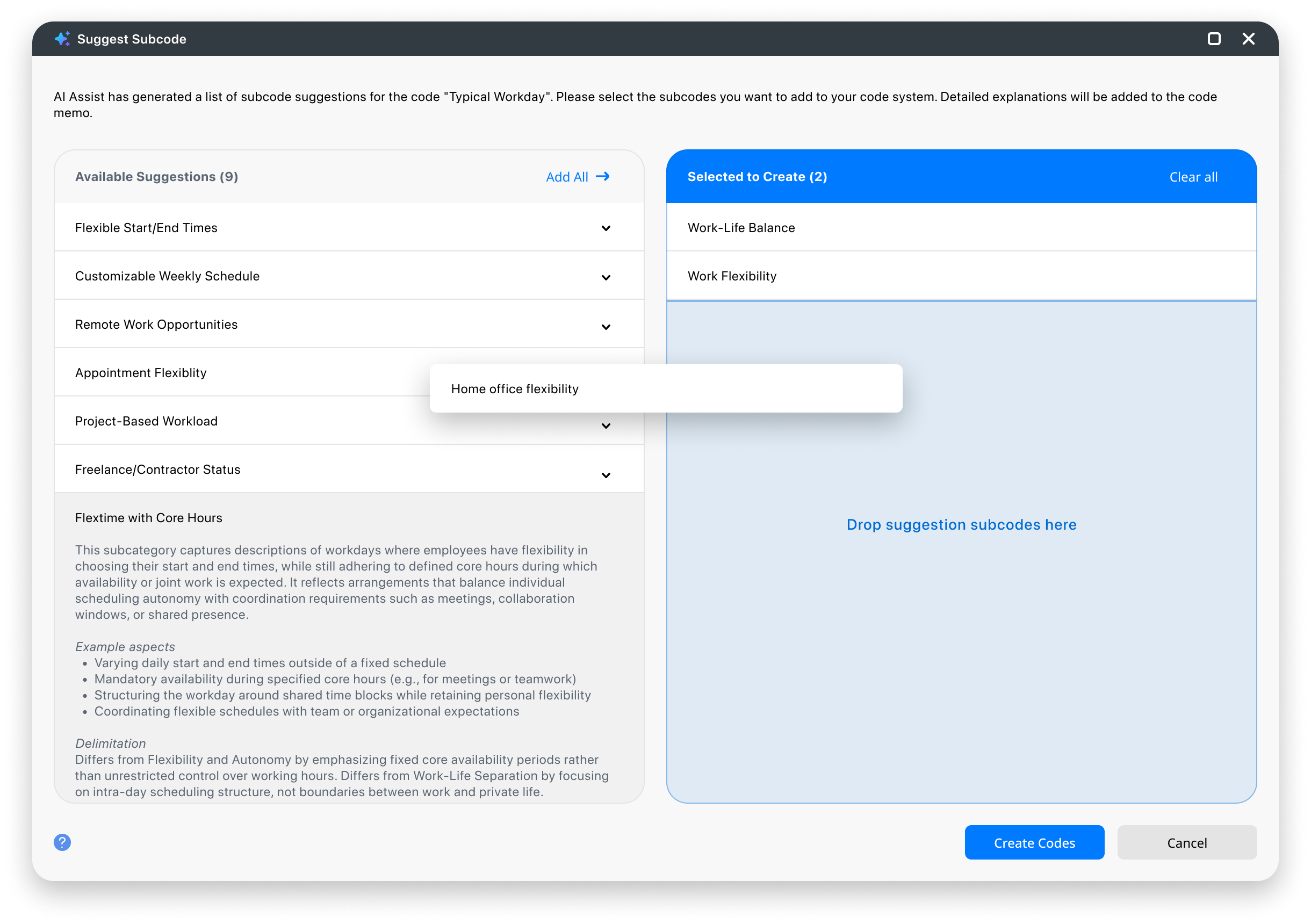
With the updated interface, you can now:
- Expand a suggestion to view its description, example aspects, and boundaries.
- Select which subcodes to create by dragging the relevant suggestions into the selection area.
- Click Create Codes to add the selected subcodes to your Code System, with explanations saved as code memos.
📍 Where to find it: Right-click any code with assigned text passages in the “Code System” window and select AI Assist > Suggest Subcodes.
AI Translations are Integrated
Translate Text Without Leaving Your Project
MAXQDA now enables in-project translation of text passages through AI Assist, allowing you to work with multilingual materials without relying on external tools.
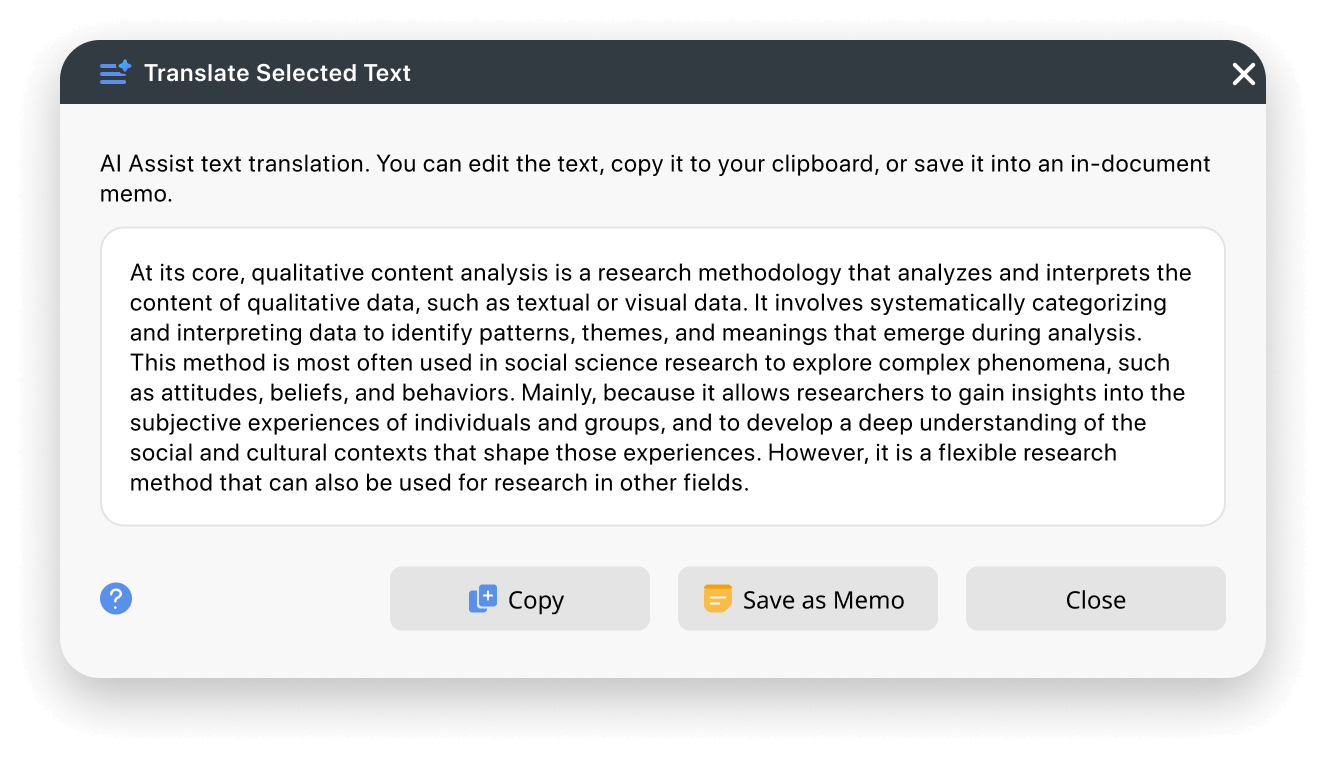
Key Benefits of the new AI Translation Feature:
- Translate passages directly within MAXQDA without interrupting your analytic workflow.
- Optionally save the translation as a memo attached to the original text for easy reference.
- Make multilingual data easier to review and discuss in research teams.
📍 Where to find it: Right-click a text passage and select AI Assist > Translate This to see the translation instantly.
Transcription Supports More Languages
Additional Languages and Saved Transcription Settings
MAXQDA Transcription‘s capabilities continue to grow with new language options and smarter documentation of your workflow. Together, these updates help you work more transparently and consistently with multilingual data, reducing setup friction while strengthening documentation and reproducibility across your analysis.
What’s new in MAXQDA Transcription:
- You can now transcribe audio recordings in Bashkir, Irish, Maltese, and Persian.
- MAXQDA now automatically saves information about the original media file and your transcription settings, including custom vocabulary, in a document memo.
📍 Where to find it: Access MAXQDA Transcription when importing your media files. For already imported files, right-click the file in the “Document System” window and select Transcribe Audio/Video File > Transcribe Automatically with “MAXQDA Transcription”. Your transcription settings are automatically saved in the document memo.
Other Notable Improvements
- AI Chat: The chat experience has been refined with three practical improvements:
- Copy an entire chat conversation in one step
- Start a new chat directly within the chat dialog for quicker access
- Archived chats in your chat history can now be reopened and continued
- Performance: The Code Matrix Browser now runs more smoothly in large projects with 5,000 codes and documents.
- Word Explorer: Synonyms are now available directly in the Word Explorer, making it easier to explore related terms.
- Media: Document Properties now display the duration of linked media files, so key media details are visible at a glance.
- MAXQDA Tailwind: Project imports have been expanded:
- Imported MAXQDA Tailwind projects now include AI Reports, organized in a dedicated document group
- Topic-related text passages from MAXQDA Tailwind are automatically coded on import, reducing manual follow-up work
How to Update and Upgrade
- How to Update MAXQDA
To update MAXQDA, free of charge, follow these three simple steps:
- Launch MAXQDA with a stable internet connection.
- Click the
 help menu icon in the bottom bar’s left corner.
 - Select Search for updates from the menu.
Once MAXQDA updates, it will give you access to all new features and improvements. Contact your local administrator if you have limited admin rights on your institution’s computers.
 help menu icon in the bottom bar’s left corner.
What Benefits does the Update include?
This MAXQDA Update introduces further improvements that meet the changing needs of qualitative research, enabling you to handle larger datasets, multilingual materials, and complex coding structures without sacrificing analytical rigor.
MAXQDA is made to complement your methodological approach, and supports you in conducting deeper, more flexible analysis as your research evolves.
This update will be particularly valuable, if:
- You’re using AI Coding to code the same concept over and over across multiple of documents
- Your project includes interviews or documents in multiple languages
- You need to trace transcription settings to ensure methodological transparency
- You’re refining an evolving code system and want support in identifying meaningful subcategories